Playground
Jev playground: try Choice, Score and Noul online
Try Jev in your browser without writing code or bringing an API key. Pick Choice, Score or Noul, edit the text and criteria, then inspect a live decision and its probabilities.
Where can I try Jev online without writing code?
Use Jagent's Jev playground to send a live Choice, Score or Noul question and inspect the returned probabilities. The shared anonymous trial allows three runs across this site's tools; continuing requires an account and available credits.
144 / 4000
Pick one option from a set you define.
The answer appears here
A chosen option, a confidence, and the distribution underneath it.
What to look at
The interesting part is not the winning option — it is the distribution underneath it. Edit an option's description and watch the probabilities move: those descriptions are the entire prompt surface of a Choice question, and writing them well is most of the skill in using Jev.
Try making the state genuinely ambiguous. A confident answer on an easy input tells you nothing; a 0.4 confidence on a borderline one tells you exactly where your threshold needs to sit.
What the Jev playground sends
Run sends two things: the state, which is the text you are asking about, and one question built from the form. The server checks both before anything is spent, then calls Jev with a 30-second timeout. For the rubric preset, what reaches the model is this, plus a model id that depends on the route:
{
  "state": "honestly whoever designed this checkout ...",
  "questions": {
    "severity": {
      "type": "score",
      "instructions": "How harmful is this content?",
      "criteria": ["Benign", "Questionable", "Harmful", "Severe"]
    }
  }
}
That is the shape TypeSafe's HTTP API takes, so a question that behaves well here carries over to your own code. The checks are about cost: the state can run to 4,000 characters and the instructions to 200. A Choice needs two to eight options with descriptions up to 200 characters each, a Score two to eight levels, and a Noul both a true and a false description.
Three presets, none of them easy
- Route a support ticket (Choice) — a customer charged for an upgrade that has not arrived, whose API calls are now failing. It is billing and technical at once. The obvious version, a double charge, comes back 1.00 to billing and makes Jev look like a keyword matcher.
- Grade on a rubric (Score) — a hostile complaint about a checkout, placed on four levels from Benign to Severe.
- Ask a yes/no question (Noul) — a password-expiry message with a link, and whether it creates artificial time pressure.
Each is a little ambiguous on purpose. A preset that came back at full confidence every time would teach nothing about what the probabilities are for.
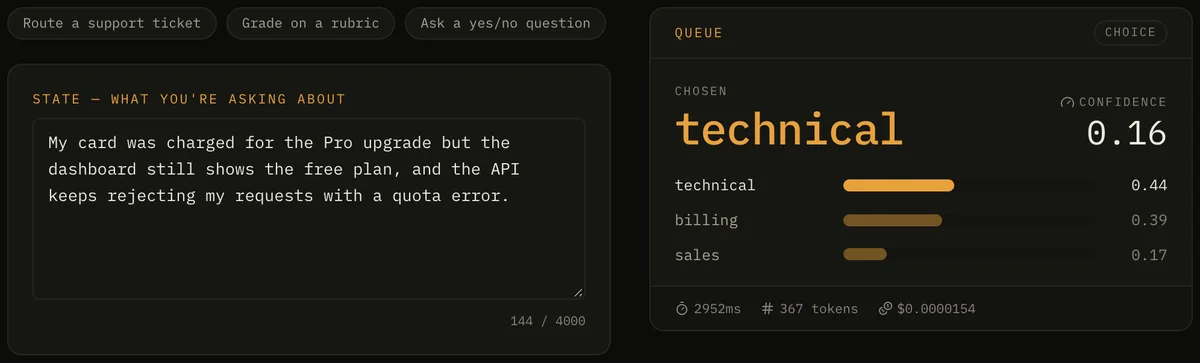
Reading a Jev playground answer
- The headline is the chosen option for a Choice, the probability for a Noul, and for a Score the nearest level with the raw score beside it.
- Confidence appears for Choice and Score only. A Noul carries none, so the card does not invent one.
- The distribution is sorted, and a Score's probabilities are relabelled from indexes to the levels you wrote.
- The footer has the call's latency and input tokens, and a cost computed from those tokens at the published $0.042 per million; output adds nothing.
A Score of 2.68 on a four-level rubric is not a typo. It is the probability-weighted mean of the level indexes, 0 to 3, so it sits between the third and fourth levels and leans to the fourth — which is why the card shows the fraction as well as the band.
Same question, a chat model
Once Jev has answered, the buttons under the card send the same state and question to Gemini 2.5 Flash Lite or Mistral Small 3.2 24B through OpenRouter, with a plain prompt that lists your options and the JSON shape to return. The reply is then checked for type: an option that is not yours, a score out of range, or a boolean where a probability was asked for is flagged.
Our own benchmark found that sending response_format: json_schema removes those type errors entirely, so a flag here shows the weakness of a plain prompt rather than of the model. Only cheap models are offered, because the comparison runs on this site's key.
How do you compare Jev and the OpenAI Decisions API side by side?
Choose GPT-6 Luna Decisions under “Compare with” and press Run: Jev and OpenAI's model get the same state and question at the same moment, and both answers appear together with a one-line verdict on whether they agree and how sure each was. The link jev-agent.com/playground?compare=gpt-6-luna opens it ready to run. Any two of the thirteen decision models pair the same way, and a side-by-side run counts as two runs.
On the support-ticket preset, run on 2026-10-09, Jev chose technical at 27% confidence and GPT-6 Luna chose billing at 88%: a ticket that mixes a charge with an API error, read two ways. The same split across hundreds of labelled items is measured on Decisions API vs Jev.
Taking a question out of the Jev playground
When a question behaves the way you want, the instructions, the option descriptions and the shape of the state all carry over. Send them to this site's endpoint with your own key, or to TypeSafe's once a waitlist key arrives; only the host and the token change.
The playground asks one question per run, but a request can carry several, and that is where the savings are: the state travels once, however many questions come with it. Measured on the server's own clock, one question took 70 ms and 5 in the same request took 74 ms. Two things do not carry over. A threshold that looks right on three examples is not a threshold, so measure it on your own labelled data. And an alias such as jev-latest moves when a release ships, so pin a versioned id such as jev-1.13.0 once you have tuned against it.
Jev playground FAQ
Can I try Jev without an API key or signup?
Yes. Jagent's browser playground makes real Jev calls without asking you to supply an API key. Anonymous use has a shared three-run allowance; after that, sign in to use your account's credits. Your Jagent API key is separate from a TypeSafe or OpenRouter key.
Method and evidence · Checked 2026-10-04
Do I need an API key to try Jev here?
No. The first three runs need no account at all. After that, signing in keeps you going and also issues a key for this site's endpoint.
Is the Jev playground calling the real model?
Yes. Every run is a live call to Jev through this site's server — TypeSafe's own API when a key is configured, then OpenRouter, then Vercel's AI Gateway — and the latency on the card is that call's.
Why is there no confidence on a Noul answer?
Because Jev does not return one for a Noul, on TypeSafe's own API or through OpenRouter. The probability is the whole answer; its distance from 0.5 is the nearest thing to a confidence.
How many options can a question have?
Up to eight options or levels here, which keeps every call small. Jev itself accepts up to 255 options in a Choice.
Does the playground keep my text?
Not on our side. Your draft is saved in your own browser and restored if you come back within a day.