How to use Jev with Claude Code, Codex and Cursor
Two ways in: a skill that teaches the agent to write code calling Jev, and a Jev MCP server or hook the agent asks while it works. Here is each one per tool, with the key kept out of the config, and what the checks cost when we ran them.
Tested 2026-11-04
How do you use Jev with Claude Code?
A Jev + Claude Code setup takes two steps: install TypeSafe's skill so the agent knows how to write Jev calls, then add a Jev MCP server to .mcp.json so the agent can ask Jev questions itself. Neither replaces the model writing your code: Jev answers bounded questions — is this diff safe, did the tests pass, which file comes first — with probabilities.
| Build time | typesafe-ai/skills — official skill |
|---|---|
| Run time | a Jev MCP server — community, or ours |
| Key | an env var — never in the file |
| Per check | $0.00001–$0.00017 — measured |
| Latency | about 0.5 s — per Jev call |
Quick answer · verified 2026-11-04
Two ways Jev fits into a coding agent
A Jev + Claude Code setup has two layers, and so does one in Codex or Cursor. At build time, the agent writes your application's Jev integration: the request, the questions, the thresholds. That is what TypeSafe documents, and what its skill is for. At run time, the agent itself asks Jev during its loop — whether a patch is safe to apply, whether a claim matches the test output, whether a command can run without a prompt. TypeSafe publishes nothing for that layer; the MCP servers, hooks and plugins below are community projects. Most setups want both.
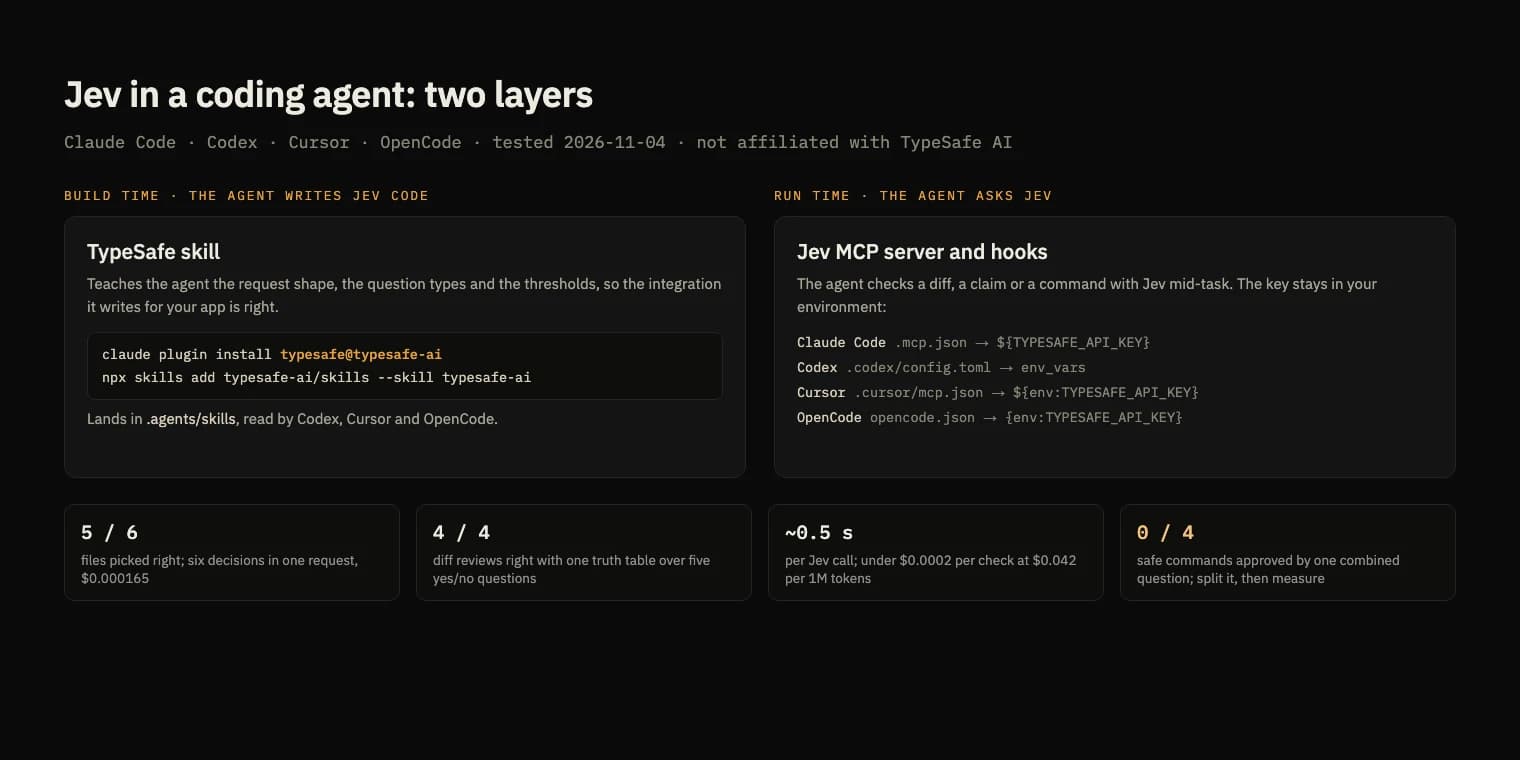
Install the TypeSafe skill in Claude Code, Codex, Cursor and OpenCode
The skill is typesafe-ai/skills (MIT, version 0.6.2 when we installed it). In Claude Code it is a plugin:
claude plugin marketplace add typesafe-ai/skills
claude plugin install typesafe@typesafe-ai --scope project
--scope project only records the plugin in .claude/settings.json; each teammate still runs the install once. For the other agents, one command writes the skill to .agents/skills, which Codex, Cursor and OpenCode all read, and links it into .claude/skills:
npx skills add typesafe-ai/skills --skill typesafe-ai -a claude-code -a codex -a cursor -a opencode -y
We confirmed Codex picks it up offline: its prompt preview listed the skill without a model call.
Add a Jev MCP server, tool by tool
We tested jkudish/jev-mcp 0.14.7, which exposes twelve tools such as jev_decide, jev_review and jev_gate and calls Jev with your TypeSafe key. Every tool can read that key from your environment, so nothing secret goes in a file you commit:
| Agent | Config file | Key reference | Our check |
|---|---|---|---|
| Claude Code | .mcp.json | ${TYPESAFE_API_KEY} | tested |
| Codex | .codex/config.toml | env_vars = ["TYPESAFE_API_KEY"] | tested |
| Cursor | .cursor/mcp.json | ${env:TYPESAFE_API_KEY} | from docs |
| OpenCode | opencode.json | {env:TYPESAFE_API_KEY} | from docs |
Jev + Claude Code
claude mcp add-json --scope project jev \
  '{"type":"stdio","command":"npx","args":["-y","@jkudish/jev-mcp@0.14.7"],"env":{"TYPESAFE_API_KEY":"${TYPESAFE_API_KEY}"}}'
The written .mcp.json keeps the variable reference as written, and Claude Code expands it at startup; GitHub Copilot reads the same file. Project servers sit at “Pending approval” until you run claude in the folder and accept them. The tools then appear as mcp__jev__jev_decide and so on.
Jev + Codex
# .codex/config.toml
[mcp_servers.jev]
command = "npx"
args = ["-y", "@jkudish/jev-mcp@0.14.7"]
env_vars = ["TYPESAFE_API_KEY"]
startup_timeout_sec = 30
Codex reads a project's .codex/config.toml only once you trust the folder; before that, codex mcp list said no servers were configured. env_vars forwards the key from your shell, where codex mcp add --env would write it into the file.
Jev + Cursor and OpenCode
// .cursor/mcp.json
{ "mcpServers": { "jev": { "command": "npx", "args": ["-y", "@jkudish/jev-mcp@0.14.7"],
  "env": { "TYPESAFE_API_KEY": "${env:TYPESAFE_API_KEY}" } } } }

// opencode.json
{ "mcp": { "jev": { "type": "local", "command": ["npx", "-y", "@jkudish/jev-mcp@0.14.7"],
  "environment": { "TYPESAFE_API_KEY": "{env:TYPESAFE_API_KEY}" }, "timeout": 30000 } } }
Set OpenCode's timeout yourself: its schema and its docs give different defaults. No TypeSafe key? This site's Jev MCP server is hosted and takes a Jagent key instead, with the client setup on its page.
TypeSafe also serves an MCP server for its documentation at https://docs.typesafe.ai/mcp, with search and read tools and no key. It has a third tool, submit_feedback, that sends a report to TypeSafe; deny it so an agent does not file one unasked.
What Jev checks cost inside a coding loop
The checks a Jev + Claude Code setup makes most, run forty times on 2026-11-04; all but one call was answered by jev-1.14.0, most through the jev-latest alias. Cost is input tokens at $0.042 per million; output is not billed.
| Check | Result | Input tokens | Cost | ms |
|---|---|---|---|---|
| Which of 20 files to open, six tasks in one request | 5 of 6 matched our labels | 3,920 | $0.000165 | 637 |
| Review four diffs: fixes the task, weakens tests, unrelated change, auth change, tests passed | 4 of 4 right with one truth table | 2,348 | $0.000099 | 467–549 |
| "All tests pass" against failing test output | contradicted at 1.0 | 1,434 | $0.000060 | 533 |
| Box: find the sign-up button in a 1280×800 screenshot | within 0.01 of the true edges | 3,035 | $0.000127 | 642–734 |
| Auto-approve shell commands, one combined question | approved 0 of 4 safe commands | 318–384 | $0.000013–$0.000016 | 538–687 |
The diff review is the pattern worth copying. One request asked five yes/no questions per diff, and code accepted a patch only if it fixed the task at 0.7 or more with every risk at 0.3 or less. That let through the good fix and nothing else. The patch that deleted the failing assertion scored 0.98 on “tests passed” — the remaining test did pass — so a tests-pass check on its own would have approved it.
Two results argue for measuring before you trust a default. The MCP server's jev_review separated good patches from bad ones by probability (0.78–0.80 against 0.04–0.07) yet returned escalate for all of them at its default thresholds, so read the numbers rather than the action. And a permission gate asking whether a command was undoable and stayed inside the project approved none of four safe commands at 0.9. Split into separate questions, “undoable” alone separated safe from risky (0.79–0.98 against 0.03–0.09). Box found the button in a clean screenshot, but on one with a cookie banner over it Box still answered; a companion question, whether the button was fully visible, is what caught it (0.02).
Hooks: where a Jev gate goes in each agent
- Claude Code:
PermissionRequest, which runs only when Claude Code is about to ask you. Print an allow decision, or nothing to leave the prompt as it is. - Codex:
PermissionRequestin.codex/hooks.json, same contract, loaded only in a trusted project after you approve the hook. - Cursor:
beforeShellExecution, which runs before every command. A crash or timeout allows the command unless you setfailClosed. - OpenCode: a plugin in
.opencode/plugins/.
Check a static list of dangerous commands before calling Jev at all: ours caught a force-push and an rm -rf in about 70 ms with no network call. Pin jev-1.14.0 once a threshold is tuned, because jev-latest moved from 1.13 in late October; the Jev versions are listed on the model page.
Setup problems we hit
- In our Jev + Claude Code setup, the server showed as connected with the key unset; the first real call then failed.
- Starting the server through
npxtook 2.6 to 10 seconds, against a 10-second default startup timeout in Codex. Raise it, or install the package and start it in under 0.3 s. - Hermes passes MCP servers only a short list of environment variables, so a key exported in your shell never reaches the server unless the config names it.
- An MCP server shipped inside a Claude Code plugin names its tools
mcp__plugin_…, so a hook matched on the bare server name never fires for them.
Community tools for Jev in coding agents
| Repository | Stars | What it does | Agents |
|---|---|---|---|
| tamaratran/fast-jev-compaction | 7,840 | Compaction: keep or drop context verbatim instead of an LLM summary | Claude Code (needs function hooks) |
| dzhng/jevgrep | 3,172 | Pick the files to read before the agent opens them | Claude Code, Codex, OpenCode |
| kerpopule/hermes-jev-skills | 1,293 | Skill routing, memory and compaction | Hermes, Claude Code, Codex |
| jkudish/jev-mcp | 569 | MCP server with twelve judgment tools; the one tested here | any MCP client |
| vinilana/jev-gateway | 325 | Route the which-tool step to Jev | Codex, Claude Code, OpenCode |
| GhalebDweikat/winnow | 114 | Hide unneeded tool output behind a recall key | Claude Code |
| shitianfang/jev-use | 67 | A PreToolUse gate plus MCP tools | Claude Code, Codex, pi |
Stars read from GitHub on 2026-11-04; all MIT. One caution from a compaction port's own README: pruning an agent's history can drop hidden reasoning and force costly prompt-cache rewrites, so measure the bill before and after. More projects, with screenshots, are in the Jev showcase.